
How does on-site audio feed into the AI interpretation system? What organizers need to prepare.
Clean audio is the foundation of accurate AI interpretation. This piece lists the mixing console, network and flow preparation organizers and venues need to provide, to keep the AI system stable on the day.
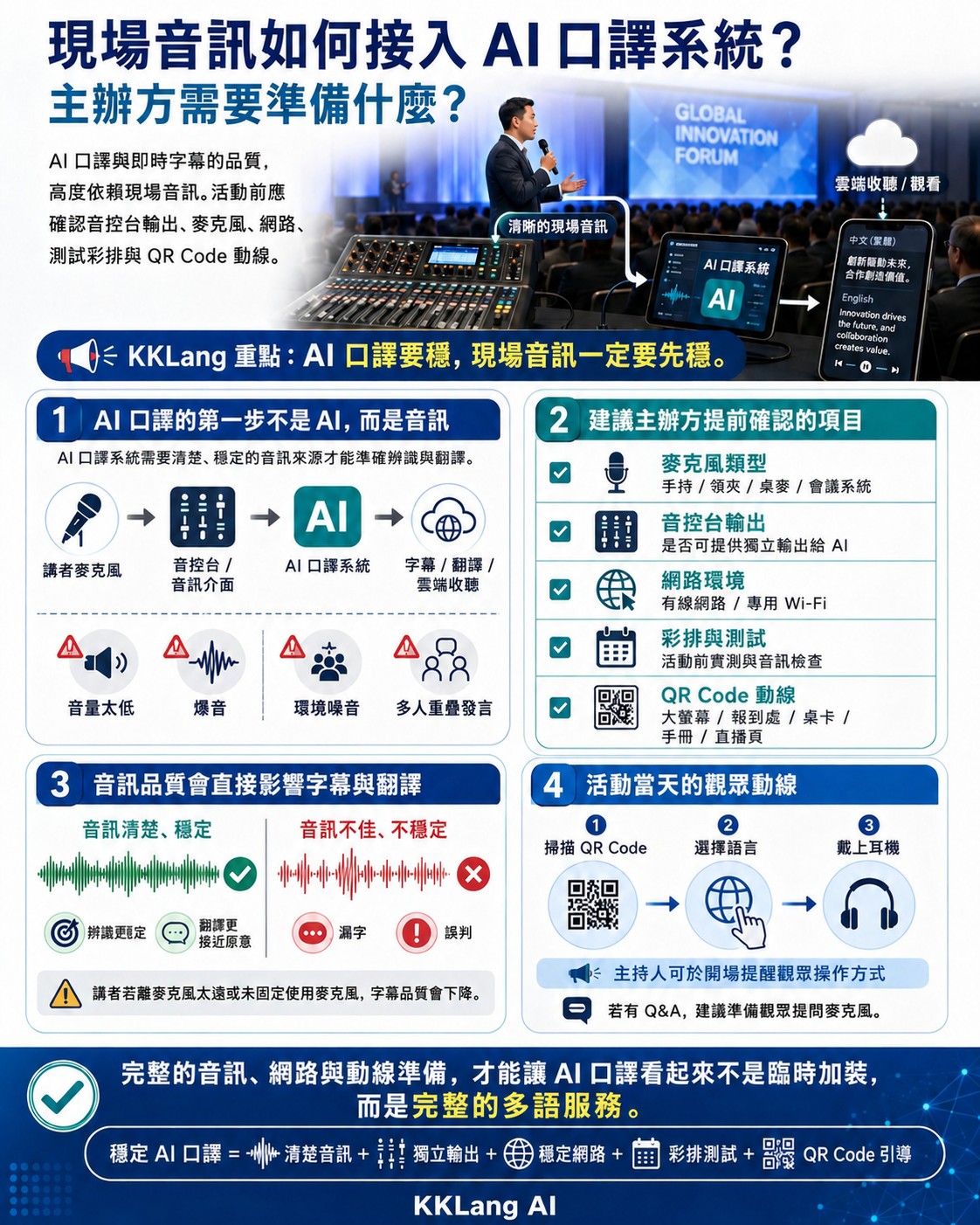
Why audio quality makes or breaks AI interpretation
About 70% of AI interpretation accuracy depends on the quality of the input audio. If the on-site audio is muddy, carries echo, mixes in background noise, or has unstable volume, the AI's speech recognition will produce a lot of errors that then drag down translation quality.
The ideal audio source is an "independent output" (aux send or direct out) taken directly from the mixing console for the speaker's microphone, rather than room mic capture of the hall. An independent output carries only the speaker's voice: no music, audience chatter or room echo: so the AI can reach its highest accuracy.
Mixing console equipment organizers need to prepare
During event planning, confirm the following with the venue or audio vendor: does the mixing console provide at least one independent output (aux send); what is the output connector type (commonly XLR or 6.3mm TRS); do you need adapter cables; and does the audio technician know how to set up an independent output.
Recommended cables and connectors: XLR female-to-male cables (3-10 meters, depending on where the AI equipment is set up), a 6.3mm TRS to 3.5mm adapter, and spare cables. Most AI interpretation providers bring their own receiving equipment, but we recommend the venue prepare the cables to ensure compatibility.
Network preparation: the lifeline of cloud listening
If you use cloud interpretation listening, a stable network is non-negotiable. We recommend at least 100 Mbps of total bandwidth for attendees, and prioritizing a wired connection for the AI server (to avoid Wi-Fi interference). The attendee-side Wi-Fi should be separated from the speaker network so the two do not compete for bandwidth.
For events of 200 or more, rent dedicated Wi-Fi equipment (such as multiple high-power APs) or ask a telecom carrier to set up a temporary cell site. Always run a real-world test before the event to simulate network performance at full load.
QR Code display and attendee flow
Where you display the QR Code directly drives the adoption rate. Show it in all of these places at once: a large standing sign at registration, a poster at the hall entrance, table cards at the end of each row, a fixed corner of the projection, and the first page of the event handout. Multiple display points make sure attendees can scan no matter where they are looking.
On flow, have the host prompt attendees to scan, pick a language and put on earphones 10 minutes before the event starts. Hand out a small card at check-in reminding people to "bring your own earphones," and prepare a small number of backup earphones (about 5% of total headcount) to lend to anyone who forgot.
Frequently asked questions
What if the venue's mixing console is old and has no independent output?
You can take the signal from the main mix, but it will include all on-site sound (music, audience chatter), which lowers AI accuracy by 10-20%. In that case, do more thorough glossary preparation and rehearsal in advance, or consider using a directional microphone to capture the speaker on site as an alternative.
Do I need a separate audio channel for each speaker?
If multiple speakers take the stage in turn, just route all microphones into the same independent output: you do not need a separate channel per speaker. But for roundtable discussions where several people speak at once, use an automatic mixer to avoid overlapping signals.
What should we test during rehearsal?
We recommend testing: the volume and quality of the mixing console's independent output, the display latency and accuracy of AI captions, the connection stability of cloud listening (simulate at least 50% of full load), the scan success rate of the QR Code, and the switchover time of the backup network.